
Grok 4 AI is the latest and most advanced version of xAI’s conversational artificial intelligence chatbot, developed by Elon Musk’s AI company xAI and integrated with X (formerly Twitter). It is designed to deliver real-time, witty, and highly intelligent responses by combining internet browsing capabilities with deep language understanding.
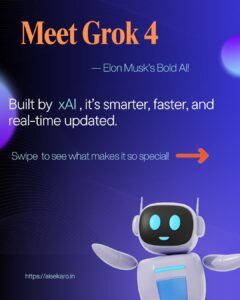
Key Features of Grok 4 AI:
 Real-time web access to provide up-to-date answers
 Built using Grok-1.5 and Grok-1.5V, with vision capabilities (can see and interpret images)
 Responds with humor, personality, and attitude, unlike traditional AI
 Integrated directly with X (Twitter) for access to trending topics and posts
 Capable of solving math problems, writing content, coding, summarizing text, and more
When was Grok 4 Released?
Grok 4 was released in June 2025, making it the latest upgrade in the Grok AI family—bringing faster response times, better understanding, and image + text-based reasoning.
 How Grok 4 Saves Time and Boosts Productivity
In today’s fast-paced digital world, time is your biggest asset. Whether you’re a content creator, marketer, student, or developer, Grok 4 AI helps you get things done faster, smarter, and better. Let’s explore how.
 1. Instant Access to Information
Instead of searching multiple websites or reading long articles, Grok 4 gives you direct, summarized, and real-time answers.
Instead of Googling “top digital marketing trends 2025,” reading 3 articles, and writing a summary — you can ask Grok 4:
“Summarize the top digital marketing trends for 2025 in 5 points.”
 2. Fast Content Generation
Blogging, social media, ad copy, emails, YouTube scripts? Grok 4 can write everything within seconds.
Want a blog intro for “eco-friendly living”? Just prompt:
“Write a 150-word friendly blog intro on eco-friendly lifestyle.”Output: Readable, SEO-friendly, and editable in under a minute.
 3. Quick Calculations & Data Processing
Grok 4 can handle math problems, financial summaries, and even code logic. No need to switch tools or open Excel.
Ask: “What’s the ROI if I invest ₹10,000 with 12% interest annually for 3 years?”
 4. Rewriting, Summarizing & Translating
Need to rewrite content, summarize a long article, or translate into another language? Grok 4 does it all in seconds.
-
 Rephrase emails
 -
 Summarize meeting notes
 -
 Translate text to multiple languages
 5. Code Help & Debugging
For developers, Grok 4 writes, explains, and debugs code on demand.
“Fix this JavaScript code that’s not adding numbers properly.”
Grok gives the corrected code + explanation — instantly.
 6. One Tool, Multiple Roles
No need to open 10 tabs or use multiple apps. Grok 4 is your:
-
Copywriter
-
Research assistant
-
Coder
-
Translator
-
Math solver
-
Data summarizer
In a world full of AI chatbots—like ChatGPT, Google Gemini, and Claude—you might be wondering:
“What makes Grok 4 different and better?”
Let’s break it down with key points, real examples, and a comparison table.
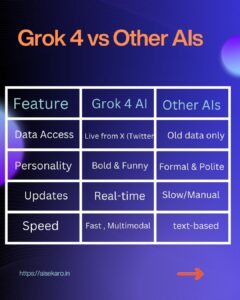
 1. Real-Time Internet Access (While Others Lag Behind)
Unlike most AI tools that rely on older, static data (like ChatGPT’s default free version), Grok 4 can access the live internet and give up-to-the-minute responses.
Ask: “What’s trending in tech today?”
Grok 4 pulls live data from X (Twitter) and gives you real answers.
ChatGPT (free version)? Can’t help.
 2. Witty, Human-Like Personality
Grok 4 is fun, sarcastic, and feels like talking to a human. It gives personality to its responses, making interactions enjoyable—not robotic.
 3. Text + Image Understanding (Multimodal)
Grok 4 is built on Grok-1.5V, which supports vision tasks—meaning it can “see” and understand images.
Upload a chart and ask: “What’s this graph showing?”
Grok 4 will describe and analyze it.
Many tools still rely only on text-based input.
 4. Social Media Integration (Especially with X)
Grok 4 is deeply integrated with X (Twitter)—it can:
Read live tweets
Understand hashtags
Show trends
Generate tweets based on news
 5. Feature Comparison Table
| Feature | Grok 4 AI | ChatGPT (Free) | Gemini (Google) | Claude (Anthropic) |
|---|---|---|---|---|
| Real-time internet access | Yes |  No No | No | Limited |
| Image understanding (vision) | Yes (1.5V) | Yes (Pro only) | Yes | Yes |
| Witty personality | Fun & human | Formal | Robotic | Professional |
| Social media awareness | Live from X | No | No | No |
| Free to X Premium+ users | Yes | Yes | Yes | Yes |
| Use cases |  Writing, Data, Code, Writing, Data, Code,  Images Images | Same | Similar | Similar |
 Step 1: Visit the X Platform (Formerly Twitter)
To begin using Grok 4, go to the official X website: https://x.com
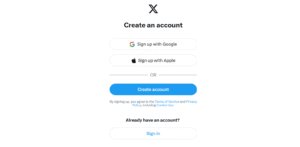
This is the only platform where Grok 4 is currently available. It’s tightly integrated into X, so all users must have an X account.
Step 2: Log In with a Premium+ Account
Grok 4 is only available to Premium+ subscribers on X.
To check or upgrade your account:
Log in to X
Go to Settings > Premium
Subscribe to Premium+
Premium+ also gives you ad-free X, higher visibility, and more tools.
Once you’re subscribed:
Tap the “Grok” icon in your left-hand menu (available on web and app)
Or go directly to the chat via:
This opens the chat window where you can interact with Grok 4 AI in real tiime
Step 4: Enter Your Prompt or Question
Now it’s time to ask Grok 4 anything! Just type in your prompt like you would in any AI chatbot.
Example Prompts:
Blog writing: “Write a 150-word intro on digital detox for my blog.”
Code help: “Fix this JavaScript code that adds two numbers but returns undefined.”
Social content: “Generate 5 funny tweets about remote work.”
Research: “Summarize the latest iPhone 16 features in bullet points.”
Step 5: Read, Refine, or Regenerate the Output
Once Grok 4 responds:
Copy the result
Ask follow-up questions
Click “Regenerate” for a different version
Edit or improve the answer using your tone
You can carry out multi-step conversations—ask Grok to write, then summarize, then translate—all in one thread.
Step 6: Use Vision (Image Upload) [Optional]
If you have access to Grok-1.5V, the multimodal version of Grok 4, you can upload an image or screenshot and ask questions about it.
Example Image Tasks:
Upload a chart: “What does this graph show?”
Upload a UI design: “How can I improve this layout?”
Upload code: “Find bugs in this screenshot.”
Frequently Asked Questions (FAQs) About Grok 4
Q1. Is Grok 4 free to use?
No, it’s only available with X Premium+ subscription.
Q2. Can Grok 4 understand images?
Yes, Grok-1.5V can process and describe images.
Q3. Is Grok 4 available on mobile?
Yes, through the X mobile app.
Q4. Can I use Grok 4 for business work?
Absolutely! It’s great for emails, reports, content, strategy, and more.
Q5. Is Grok 4 better than ChatGPT?
Yes, in real-time access, social media awareness, and personality style.